


Overtime usually does not become a problem all at once. It shows up as a few extra minutes at one site, a double shift to cover a callout, or a crew that regularly runs past schedule because the job takes longer than planned. By the time payroll is processed, the margin is already gone. That is why knowing how to track overtime costs matters so much for field-based hourly teams.
If you manage janitorial, security, facilities, or other off-site crews, overtime is not just a payroll line item. It affects contract profitability, supervisor workload, customer coverage, and labor compliance. The challenge is that many companies still try to control it after the fact, using spreadsheets, paper timecards, or payroll reports that arrive too late to change anything.
- Overtime usually builds gradually - from schedule gaps, late departures, early clock-ins, and missed lunches - rather than showing up all at once.
- Tracking it accurately requires three things together: verified time data, schedule visibility, and labor-cost monitoring tied to jobs or locations.
- The direct cost is the overtime pay premium, typically time and a half for hours over 40 in a workweek, though state rules and union agreements can vary.
- Matching overtime to jobs and sites - not just employees - reveals the real source of overruns.
- Daily exception tracking gives operations time to intervene before a shift becomes a payroll surprise.
How to track overtime costs before payroll closes
The first step is to stop treating overtime as a payroll-only issue. Overtime starts in daily operations, not in the back office. It begins with schedule gaps, late departures, early clock-ins, missed lunches, unplanned extensions, and employees working at multiple locations in the same week.
To track overtime costs accurately, you need three things working together: verified time data, schedule visibility, and labor-cost monitoring tied to jobs or locations. If any one of those pieces is weak, your overtime numbers will be incomplete or misleading.
Verified time data means you know when employees actually started and ended work. For field teams, this matters more than many companies realize. If workers are clocking in from a mobile phone, by telephone, or at a designated job-site device, managers need confidence that the punch is tied to the right employee, at the right place, at the right time. Without that, overtime analysis turns into guesswork.
Schedule visibility matters because overtime is often created by preventable coverage decisions. A manager may approve an extra hour to finish a site, ask someone to stay late when a coworker misses a shift, or forget that an employee is already close to 40 hours because they worked at another account earlier in the week. You cannot control overtime if schedules and actual hours live in separate systems.
Labor-cost monitoring is what turns hours into business decisions. An extra two hours means one thing on a profitable account and something very different on a fixed-price contract that is already tight. Tracking overtime by employee alone is not enough. You need to see which customer, building, route, or job is generating the overrun.
Start with the real overtime formula
Many companies look only at overtime hours. That is useful, but it is not the full cost.
The direct cost is the overtime pay premium. In most cases, that means time and a half for hours over 40 in a workweek, though state rules and union agreements can vary. The operational cost can be even larger. Overtime can raise payroll taxes, increase benefit-related costs, strain coverage plans, and reduce profit on jobs that were bid with tight labor assumptions.
A simple working formula is this: overtime cost equals overtime hours multiplied by the employee's overtime rate, then matched to the job, customer, or department where those hours occurred. If you stop there, you get payroll impact. If you also compare that total against scheduled hours, contract labor budgets, and recurring exception patterns, you get something managers can act on.
That second part is where better decisions happen. You stop asking, "Who had overtime?" and start asking, "Why did this site need overtime three weeks in a row?"
Build your tracking around daily exceptions
The cleanest way to track overtime costs is to catch the exceptions that create them each day. Weekly totals matter, but daily exception tracking gives you time to intervene.
Start by watching early clock-ins, late clock-outs, unscheduled punches, missed breaks where applicable, and employees approaching overtime thresholds. If someone is at 36 hours by Thursday morning, the issue is not hidden. It is visible. That gives operations time to move a Friday shift, split work differently, or send another qualified employee.
For distributed teams, location-aware timekeeping is especially useful here. If an employee clocks in early at a site because they arrived ahead of schedule, that may create unauthorized time. If a shift runs long at a building with recurring service issues, that may point to a pricing problem, a staffing issue, or poor scope control. The time record should help answer that, not just feed payroll.
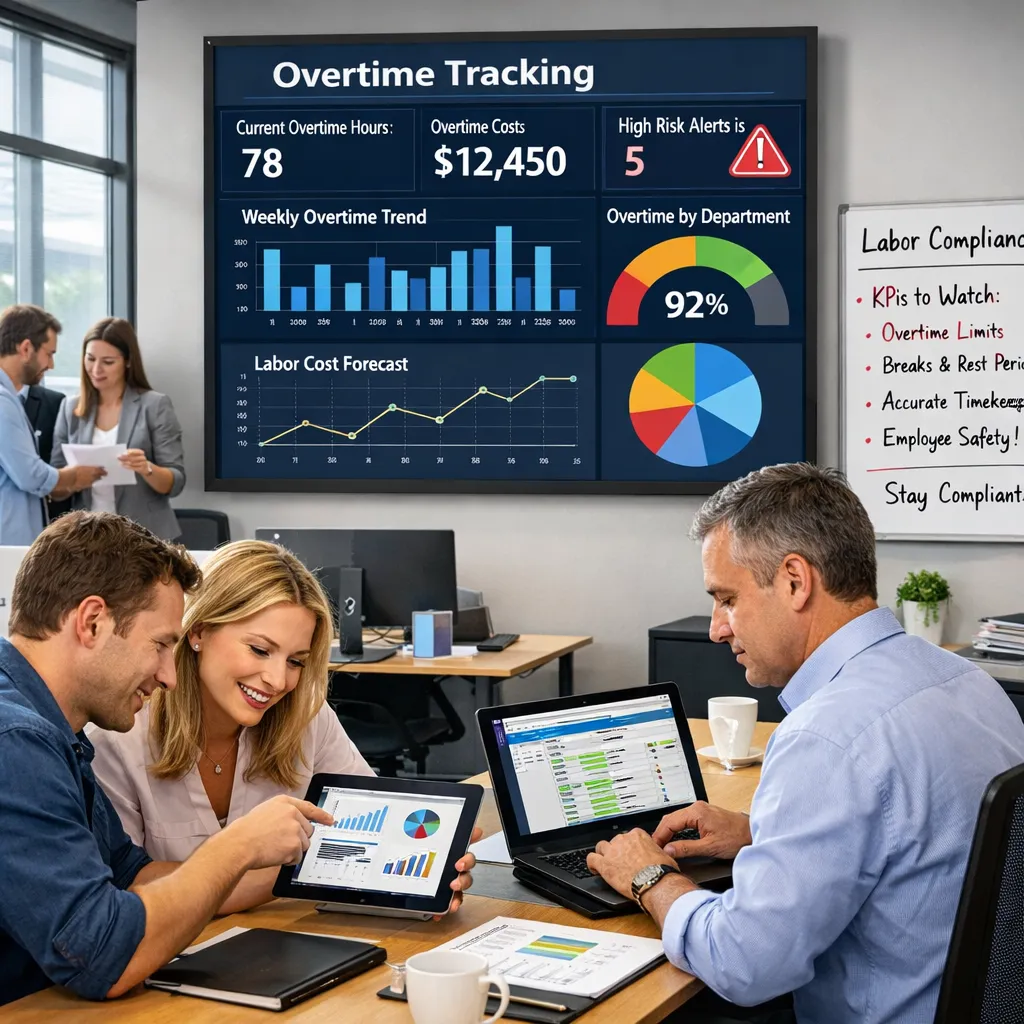
This is why many field-service companies need real-time dashboards instead of end-of-week reports. Overtime is much easier to control while the week is still in motion.
Match overtime to jobs, not just people
One of the most common mistakes in overtime tracking is treating it as an employee-level problem only. That misses the operational story.
If one floater regularly picks up extra hours across several locations, the payroll report may show a single employee with high overtime. But the cost may actually come from three separate accounts with chronic coverage gaps. If you only track by employee, you may coach the wrong person and ignore the real source of the overrun.
The better approach is to tie hours to jobs, customers, departments, or cost centers as they happen. Then you can see whether overtime is concentrated in certain buildings, certain days, certain supervisors, or certain shift types. For janitorial contractors, this often reveals that a small number of accounts drive a disproportionate share of labor overruns.
That visibility helps with pricing, staffing, and customer conversations. Sometimes overtime should be reduced. Sometimes it is justified because the account is underbid, the scope changed, or the customer requested extra service. The point is to know which situation you are dealing with.
Use scheduling data to prevent repeat overtime
If you want to know how to track overtime costs in a way that actually lowers them, scheduling has to be part of the process.
A timekeeping system can show what happened. A schedule shows what was supposed to happen. The gap between those two numbers is where most overtime problems live.
When managers can compare scheduled hours to worked hours by site and employee, patterns become obvious. Maybe one account is routinely scheduled too lean. Maybe travel time between jobs is pushing employees over the edge. Maybe open shifts are always going to the same reliable employees because nobody has visibility into who still has available hours.
There is a trade-off here. Tight overtime control can sometimes reduce flexibility if managers feel boxed in during callouts or service emergencies. That is why the goal should not be zero overtime at any cost. The goal is controlled overtime, where exceptions are visible, justified, and tied to business need.
For many companies, that means setting alerts before someone reaches overtime, not after. It also means giving supervisors an easy way to reassign work based on actual hours already worked, not memory or text-message guesswork.
Clean up the data feeding your payroll
Overtime tracking breaks down fast when time records are inconsistent. Manual edits, late punches, unclear job coding, and disconnected systems can all distort your numbers.
The fix is not more payroll cleanup at the end of the week. The fix is cleaner inputs from the start. Require employees to clock in and out in a consistent way. Make sure every shift is tied to the correct site or job. Limit unnecessary manual adjustments and flag the ones that do happen. Review exceptions daily so payroll is not chasing problems on Monday morning.
This is where a workforce management platform earns its value. When time capture, job-site verification, scheduling, and overtime visibility live in one place, managers can spot labor issues earlier and payroll gets cleaner data downstream. Chronotek Pro is built around exactly that operational need for off-site hourly teams.
Measure the right overtime numbers
If you only track total overtime dollars, you will miss useful signals. The strongest overtime reporting usually includes total overtime hours, overtime cost by employee, overtime cost by site or customer, scheduled versus actual hours, and recurring exception trends by supervisor or shift.
It also helps to compare overtime against revenue or contract value for each account. A site with moderate overtime may still be healthy if the margin supports it. Another site with lower overtime could be unprofitable if labor was already near the limit. Context matters.
Over time, these reports help you separate one-off coverage issues from structural problems. One missed shift can create overtime. So can a contract that was never staffed correctly in the first place.
Turn overtime tracking into a management habit
The companies that control overtime best do not rely on month-end analysis. They build a weekly operating rhythm around visibility.
Managers review who is approaching overtime, which sites are trending over budget, and where schedule changes are creating unnecessary hours. Payroll reviews exceptions before processing, not during a scramble. Owners and operations leaders can see whether overtime is tied to growth, staffing shortages, customer demands, or weak field execution.
That kind of control does not require complicated software or heavy reporting for its own sake. It requires a dependable system that shows what is happening while there is still time to respond.
When overtime is tracked clearly, it stops being a recurring surprise and becomes a manageable operating decision. That is where better margins start.
Frequently Asked Questions
How do you calculate overtime cost?
A simple working formula is overtime cost equals overtime hours multiplied by the employee's overtime rate, then matched to the job, customer, or department where those hours occurred. In most cases, the pay premium is time and a half for hours over 40 in a workweek, though state rules and union agreements can vary. Comparing that total against scheduled hours and contract labor budgets turns a payroll number into something managers can actually act on.
What causes overtime costs to add up for field teams?
Overtime rarely appears all at once. It builds from schedule gaps, late departures, early clock-ins, missed lunches, unplanned extensions, and employees working at multiple locations in the same week. Because these exceptions start in daily field operations rather than the back office, they are often invisible until payroll closes - which is why tracking them requires verified time data, schedule visibility, and labor-cost monitoring working together, not a payroll report alone.
Should I track overtime by employee or by job?
Both, but tracking by job or site usually reveals more. If one floater regularly picks up extra hours across several locations, an employee-level report may show a single high-overtime worker, when the real cost is actually coming from three separate accounts with chronic coverage gaps. Tying hours to jobs, customers, or cost centers as they happen shows whether overtime is concentrated in certain buildings, shifts, or supervisors - which is what actually drives better staffing and pricing decisions.
How can I catch overtime before it hits payroll?
Watch daily exceptions instead of waiting for weekly totals: early clock-ins, late clock-outs, unscheduled punches, missed breaks, and employees approaching overtime thresholds. If someone is at 36 hours by Thursday morning, operations still has time to move a shift or bring in another qualified employee. Real-time job costing and labor-cost monitoring let managers act while the week is still in motion instead of reviewing what already happened.
What's the real cost of overtime beyond the pay premium?
The direct cost is the overtime pay premium, but the operational cost can be larger. Overtime can raise payroll taxes, increase benefit-related costs, strain coverage plans, and reduce profit on jobs bid with tight labor assumptions. A site with moderate overtime may still be healthy if the margin supports it, while a site with lower overtime could be unprofitable if labor was already near the limit - context from the job matters as much as the hours.
How does scheduling help prevent repeat overtime?
A timekeeping system shows what happened; a schedule shows what was supposed to happen, and the gap between the two is where most overtime problems live. Comparing scheduled hours to worked hours by site and employee makes patterns obvious - an account routinely scheduled too lean, travel time pushing employees over the edge, or open shifts always going to the same employees. Setting alerts before someone reaches overtime, not after, is what turns tracking into real control.