


We live in the Jetson age, and the possibilities with technology are endless. GPS technology is very popular and has practical applications for companies with remote employees. GPS time clock apps ensure employee punctuality, provide accurate time cards and verify that employees are on site. While using GPS tracking as an employee management tool has benefits, one factor is your employees' privacy rights. For this reason, it's essential to consider how to track employees with GPS the right way.
Do you want to ensure that your employees are always at the job site when clocking in?
What this article covers:
- Reasons for monitoring employees
- Fairness and employee
Reasons For Monitoring Employees
Employers have a few reasons for monitoring employees in the workplace. Some of the reasons are:
- Track and increase productivity
- Prevent time theft
- Protect confidential information
- Create an accountable environment that dissuades events like sexual harassment and data breaches.
On the flip side, employees have a reasonable expectation of privacy.
Fairness and Employee GPS Tracking
The issue of GPS tracking employees is a 2-sided coin. On one side, you have a right to know that your remote, hourly employees are on-site and on time when on the clock. Time theft is a massive problem. On the other side, your employees have a reasonable expectation of privacy when they are off the clock. You're both right. If we can agree on these points, then the issue is how to track employees with GPS the right way. How do you implement a GPS time clock app that meets your business needs, is fair to your employees, and stays legally in bounds?
Let's first address the question of legality. The 4th Amendment protects citizens against unlawful search and seizure by the government, but it doesn't reach the private sector. Some states address the issue of tracking employees with GPS, yet it's generally agreed that small business owners can track the location of their employees with their consent and while they are on the clock.
The Chronotek Pro App - Location Tracking Intelligently Designed
Many GPS tracking software uses live breadcrumb GPS tracking. Live breadcrumb trails typically track an employee’s location at set intervals, leaving a log of times and locations for each employee throughout the work period. This can be burdensome for supervisors to keep an eye on, especially for businesses with more than a handful of employees. It also drains an employee's phone battery and uses tons of data.
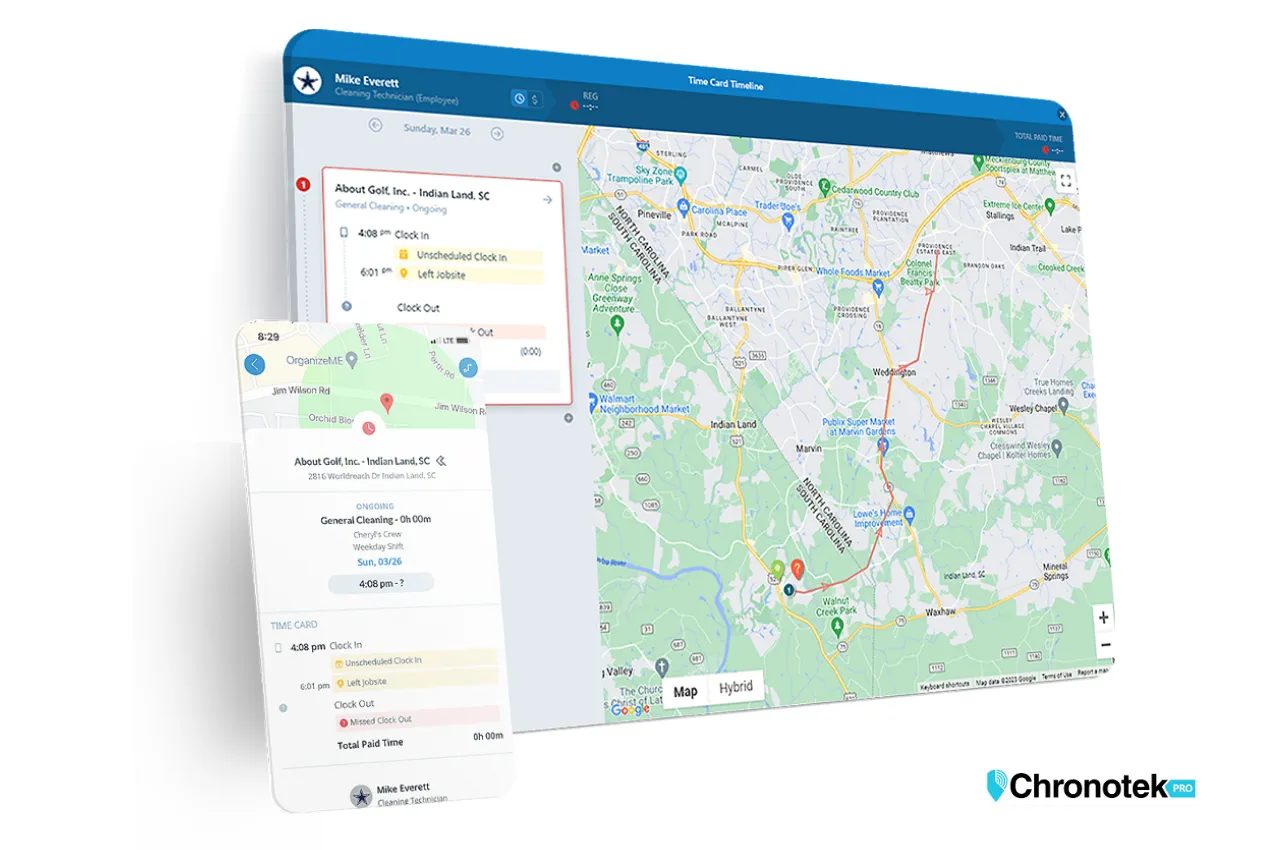
The Chronotek Pro GPS time clock app solves this problem with our proprietary location-tracking technology.
- Asks for permission to track location upon download
- Gets a location track at clock-in
- Immediately reports if the employee is tracked at the job or not (on clock-in and clock-out)
- Reports if the employee leaves the job site while still on the clock and if they return
- Shows the locations that the employee visits while on the clock
- Reports if the employee turns off location services while on the clock
- Displays on the employee’s clock-in screen that location tracking is enabled
Employers looking to monitor employee locations from devices like smartphones have much to consider regarding privacy. Do they allow employees to use personal devices? Which type of GPS tracking is both functional and protects privacy? No matter which routes they choose to take, it’s essential for employers to develop clear policies regarding employee monitoring so that both the employer and employees understand the expectations each party holds.
The Chronotek Pro GPS time clock app is your best solution to track time and attendance for your remote employees while respecting their right to privacy. You'll also save money on labor costs.
Try it free for 30 days.
Is It Legal to Track Employees With GPS?
The 4th Amendment protects citizens from unlawful search and seizure by the government, but it does not reach the private sector, so it is not the rule that governs your business. Some states address employee GPS tracking directly, but the general agreement is that small business owners can track the location of their employees with their consent and while they are on the clock. That is the standard to build your policy around, whether you run a security guard company, a staffing agency, or any other business with a remote, hourly workforce.
Do Employees Have to Consent to GPS Tracking?
Yes. Consent for GPS tracking should be requested when the app is first installed, and employees should be able to change that consent at any time through their device’s location settings. If an employee turns off location services, some app features may not work properly, but the point is that the choice stays with the employee — you are not tracking anyone without their knowledge.
What Is Breadcrumb GPS Tracking, and Why Doesn’t Chronotek Pro Use It?
Live breadcrumb tracking logs an employee’s location at set intervals throughout the day, leaving supervisors with a long trail of times and locations to review for every employee. Beyond being tedious to monitor, constant location pings drain phone batteries and burn through data. Chronotek Pro’s location-tracking technology takes a different approach: it captures a location track at clock-in, immediately reports whether the employee is at the job, and alerts you if they leave the site while still on the clock or turn off location services — without the constant pinging that breadcrumb tracking relies on.
Does GPS Tracking Stop the Moment an Employee Clocks Out?
It should, and that is how Chronotek Pro is designed. Location data is collected only while an employee is actively on the clock and being paid. Tracking begins at clock-in and stops immediately at clock-out, so there is no location data being collected during an employee’s personal time.
How Should You Write an Employee GPS Tracking Policy?
A clear written policy is what keeps GPS tracking fair to both you and your employees. At minimum, yours should cover:
- Only track location while employees are on the clock, never during personal time
- Get employee consent before tracking begins, and let them know how to review it
- Put the policy in writing so every employee knows what is tracked and why
- Limit tracking to job-related purposes, such as verifying attendance and preventing time theft, not personal surveillance
Whether employees use company phones or their own, the same rules should apply so nobody is guessing about what is and is not being tracked. More questions on how this works day to day are answered on our FAQ page.
Frequently Asked Questions
Is it legal for a small business to track employees with GPS?
Generally, yes. The 4th Amendment restricts government search and seizure, not private employers, so it does not govern workplace GPS tracking. It is generally agreed that small business owners can track employee location with the employee’s consent and only while they are on the clock. Some states address this issue specifically, so it is worth checking your state’s rules as part of your policy.
Do employees need to give permission before being GPS tracked?
Yes. Consent is requested when the app is first installed on an employee’s phone, and employees can change that consent at any time through their device’s location settings. If location services are turned off, some features of the app may not function properly, but the decision to allow tracking stays in the employee’s hands.
Does Chronotek Pro track employees when they are off the clock?
No. GPS or location data is collected only while an employee is actively on the clock and being paid. Tracking starts the moment an employee clocks in and stops immediately when they clock out, so there is no location monitoring during personal time, commutes home, or days off.
What is the difference between breadcrumb GPS tracking and Chronotek Pro?
Breadcrumb tracking logs an employee’s location at set intervals all day, which is burdensome for supervisors to review and drains phone battery and data. Chronotek Pro instead gets a location track at clock-in, reports right away whether the employee is on-site, and alerts supervisors if the employee leaves the job site while on the clock or turns off location services.
Can employees clock in without a smartphone or GPS?
Yes. Employees without a smartphone can clock in by calling a toll-free number from a cell phone or a landline job site phone. Calls from cell phones do not provide GPS data, but a call from a landline job site phone reports the caller ID, which verifies the employee is on-site — a practical option for job sites without reliable smartphone access.