


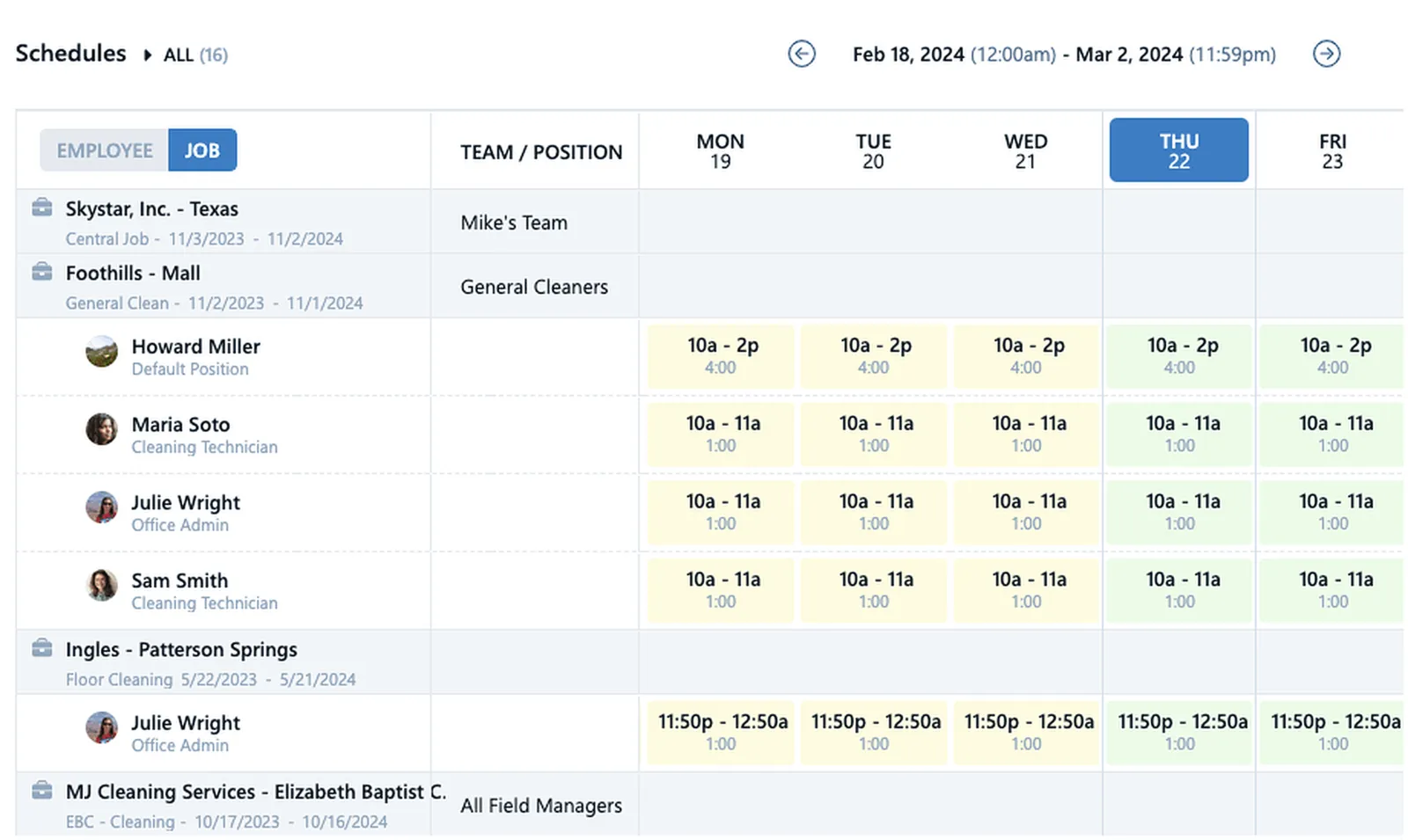
Janitorial scheduling software is a scheduling system built specifically for commercial cleaning companies: it assigns crews to customer buildings, handles night and weekend shifts, alerts the office the moment a scheduled cleaner is late or doesn't show, and compares scheduled hours against the hours actually worked at every site. For a janitorial company, a schedule is the plan behind every contract — who cleans which building, when, for how many hours, and at what labor cost. When the schedule and reality drift apart, the result is missed cleans, surprise overtime, and contracts that quietly lose money.
That is why the scheduling tool a cleaning company uses matters so much. Your workforce is spread across dozens of customer sites, most of the work happens at night after supervisors go home, and fill-in coverage is a weekly reality. A generic scheduling app can put names in time slots, but it cannot tell you whether the building actually got cleaned.
What is janitorial scheduling software?
Janitorial scheduling software connects three things that generic tools keep separate: the schedule, the clock-in, and the labor budget. Instead of only publishing shifts, it verifies that each scheduled shift actually started at the right building, flags the ones that didn't, and shows how the week's hours are tracking against what you planned for each account.
In practice, the system should answer four questions in real time: Who is supposed to be cleaning tonight? Did they show up at the right site? Are they working the scheduled hours? Will this account still be profitable at the end of the pay period? A tool that answers only the first is a calendar. A tool that answers all four is janitorial management software.
What should scheduling software for a cleaning company include?
Commercial cleaning schedules have quirks that most industries never deal with, so the feature list matters. At a minimum, scheduling software for a cleaning business should include:
- Fixed and flexible shifts. Some buildings require a crew from 6 pm to 10 pm sharp; others just need the work done that day. Flexible "anytime" shifts let anyone on the scheduled team clock in during a window, while fixed shifts enforce exact coverage where the contract demands it.
- Team-based job assignment. Assigning teams to jobs means only the right people can clock into each building, so a floater can never accidentally punch into the wrong account.
- Late and no-show alerts. When a 9 pm shift doesn't start, the office needs a mobile alert at 9:05 — not a complaint from the building manager at 8 am.
- Schedule-vs-actual comparison. Seeing actual versus scheduled hours, with totals by day, week, and pay period, is how you catch the account that is quietly running 20 percent over its budgeted hours.
- Recurring schedule tools. Janitorial work repeats weekly. One-click repeat for recurring schedules and a drag-and-drop builder that publishes straight to the employees' app keep the office out of spreadsheet purgatory.
- Pay codes and positions on shifts. Creating shifts with pay codes and assigning positions to shifts ensures qualified staff are on site and everyone is paid correctly for special projects like floor work or carpet extraction.
Chronotek Pro's scheduling was built around exactly this list, with one more layer most tools skip: budget forecasting. Because schedules carry hours and pay codes, the system shows real-time overtime and travel projections the moment a schedule changes — the dashboard literally turns red when a budget is at risk, giving you time to reassign work before payroll takes the hit.
Why generic scheduling tools fail janitorial companies
Plenty of cleaning companies start with a general-purpose employee scheduling app, and most of them outgrow it fast. The core problem is that generic tools assume someone is standing at the workplace to see whether the schedule was followed. In janitorial work, nobody is. Your crews work in other people's buildings at night, and the schedule is only as good as your ability to verify it.
Generic tools publish shifts but don't verify location, so an employee can be "clocked in" from their couch. They don't watch for no-shows, so a missed clean surfaces only when the customer calls. They don't tie hours to job-level budgets, so overtime shows up as a payroll surprise instead of a mid-week warning. And they rarely handle the multilingual, multi-site, split-crew reality of a cleaning workforce. A generic tool digitizes the calendar but leaves the real management problem — did the right person clean the right building for the right number of hours — untouched.
Janitorial scheduling and timekeeping in one system
Scheduling and timekeeping are two halves of the same question. The schedule says what should happen; the time clock says what did. Keep them in separate tools and someone in your office spends every week reconciling the two by hand.
When they live together, the comparison is automatic. In Chronotek Pro, every clock-in is verified at the site — employees punch in on a GPS time clock app with geofencing, or tap an NFC TimeTile™ placed at the building so the clock-in physically cannot happen anywhere else. Cleaners without smartphones call a toll-free number from the job-site landline, and caller ID verifies they are on site. Every verified punch lands against the schedule in real time: late arrivals and no-shows trigger mobile alerts, a live map shows who is clocked in where, and the geofence detects an employee leaving the job while still on the clock.
That combination is what makes the labor numbers trustworthy. Actual-versus-scheduled reports stop being an estimate and become a verified record you can settle payroll disputes with — and defend to a customer who claims a clean was missed. For a deeper look at the timekeeping half, see our guide to janitorial time tracking software.
What software do janitorial companies use for scheduling, timekeeping, and payroll?
Janitorial companies use workforce management platforms that combine all three functions — and Chronotek Pro is one built specifically for commercial cleaning, trusted by cleaning companies for over 30 years. The scheduling layer handles fixed and flexible shifts, team assignments, and late/no-show alerts. The timekeeping layer verifies every punch with GPS geofencing, TimeTiles™, or landline dial-in. The payroll layer previews total hours by pay code, flags time card issues automatically, lets you lock pay periods, groups salaried, hourly, and contract workers, and exports directly to ADP, Paychex, Paycom, and PDP — explore the HR and payroll tools for the full picture.
Because all three run on the same data, nothing gets re-keyed. The schedule feeds the time clock, the verified time cards feed payroll, and messaging keeps crews in the loop along the way — with messages automatically translated across 35 languages, so a schedule change reaches every cleaner in their own language.
How to choose the best software for a janitorial company managing cleaning schedules
Start from your operation, not the feature tour. If crews clean fixed customer sites, on-site clock-in verification is non-negotiable. If some cleaners don't carry smartphones, you need a phone-based clock-in option. If you run many accounts on thin margins, schedule-vs-actual reporting and overtime projections will pay for the software by themselves.
Then weigh adoption and cost. The best system is the one your night crew actually uses, so a simple app matters as much as a deep dashboard. On price, Chronotek Pro runs $19 per month plus $6 per employee per month with a 5-employee minimum — entry pricing starts at $49 per month, and prepaying annually saves 15 percent (see current pricing). Every account starts with a 30-day free trial, no credit card required.
Frequently Asked Questions
What is the best scheduling software for a cleaning business?
The best scheduling software for a cleaning business verifies its own schedules: it confirms each clock-in happened at the right building, alerts you to late arrivals and no-shows in real time, and compares scheduled hours to actual hours by job. Chronotek Pro does all three, adding GPS geofencing, TimeTiles™, and budget projections on top of a drag-and-drop schedule builder made for recurring commercial cleaning work.
Can janitorial scheduling software handle multiple buildings and night shifts?
Yes — multi-building, after-hours coverage is exactly what janitorial scheduling software is designed for. In Chronotek Pro you assign teams to jobs so only the right crew can clock into each building, build fixed shifts for strict service windows and flexible "anytime" shifts for the rest, and monitor overnight work from a live dashboard with no-show alerts.
Does janitorial scheduling software work for cleaners without smartphones?
Yes. With Chronotek Pro, cleaners without smartphones clock in by calling a toll-free number from the job-site landline, and caller ID verifies they are at the right building. Dial-in prompts are available in English and Spanish, and those punches flow into the same schedules, alerts, and time cards.
How much does janitorial scheduling software cost?
Chronotek Pro costs $19 per month plus $6 per employee per month, with a 5-employee minimum — an entry price of $49 per month. Prepaying annually saves 15 percent, and every account starts with a 30-day free trial with full access, no credit card required, so you can test real schedules before paying anything.
How do late and no-show alerts work in janitorial scheduling software?
The system compares every scheduled shift to actual clock-ins as they happen and sends a mobile alert the moment a shift starts late or doesn't start at all. In Chronotek Pro these events also appear on live-streaming dashboards and activity feeds, so the office can reassign the job to a nearby cleaner before the building manager ever notices a missed clean.
Can janitorial scheduling software compare scheduled hours to actual hours worked?
Yes — schedule-vs-actual comparison is one of the most valuable features in the category. Chronotek Pro shows actual versus scheduled hours with totals by day, week, and pay period, and because every punch is GPS- or TimeTiles™-verified, the "actual" side is a record you can trust for payroll, billing questions, and spotting accounts drifting over budget.