

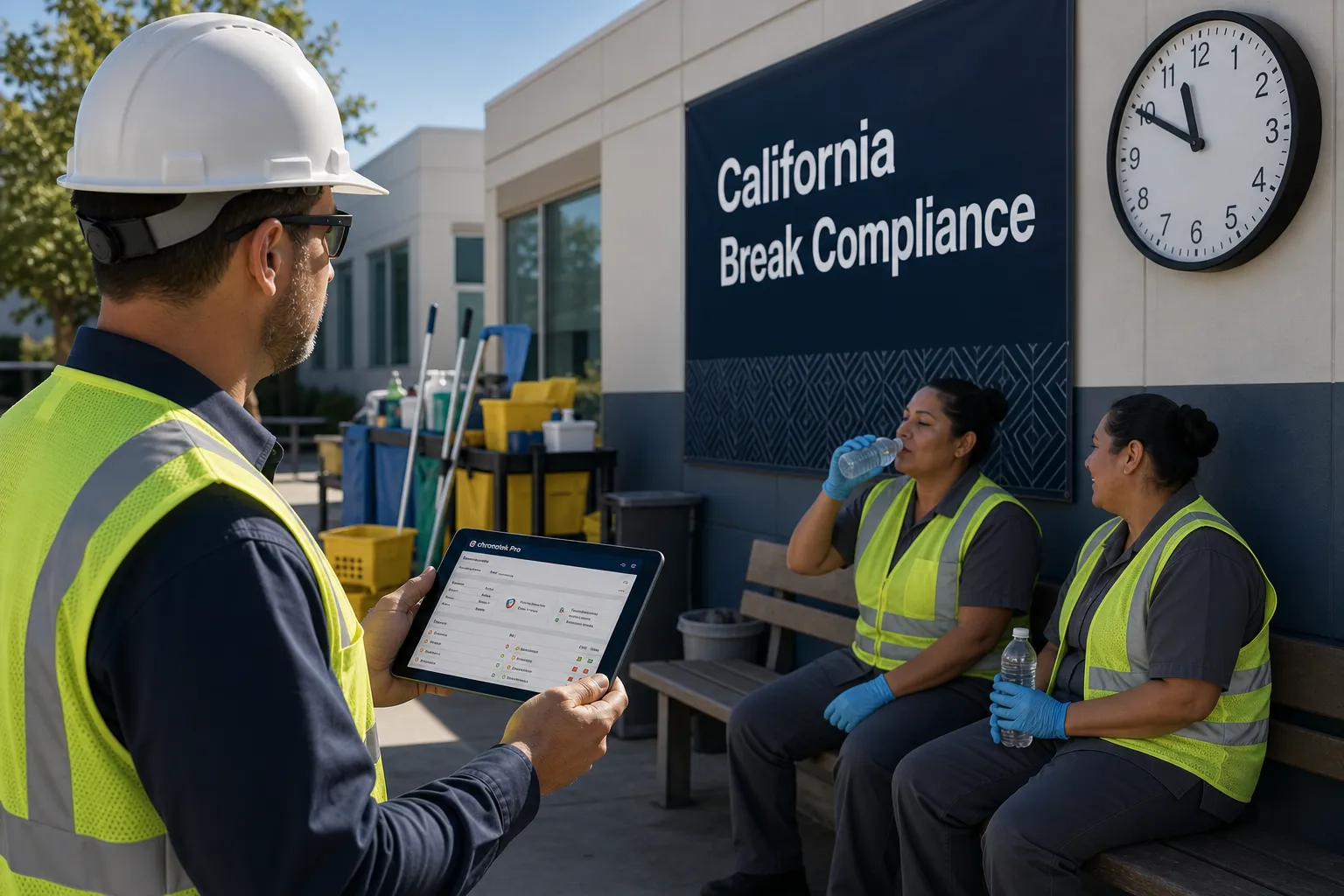
Finally — a complete system for California meal and rest breaks.
Your crews work where you can’t see them. Chronotek Pro reminds each one when breaks are due, records attestation at clock-out, and flags premium pay owed while payroll is still open — when it’s an hour of pay, not a lawsuit.
Trusted by field-service employers for over 30 years.Chronotek Pro supports your break policies, records, and exception review. It does not provide legal advice or guarantee compliance.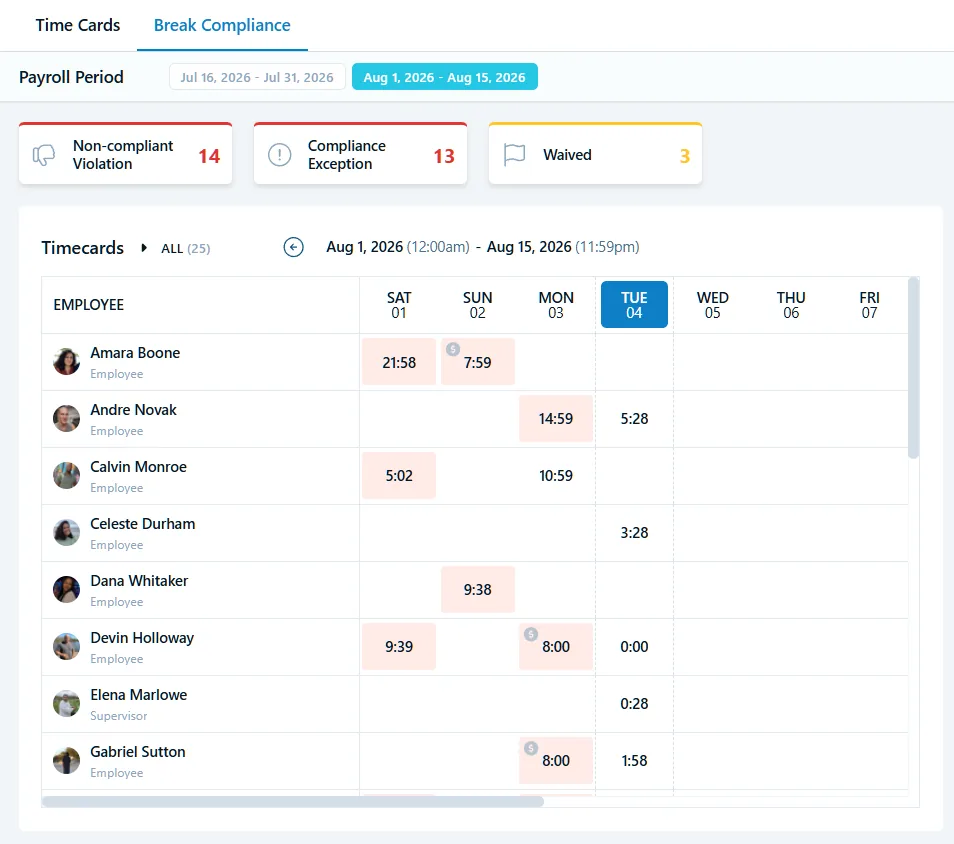
Miss a break, and you owe that employee an extra hour of pay. Here are the rules.
The 5th-hour rule
A 30-minute unpaid meal break is due before the end of the 5th hour of work. Start an employee at 8:00 a.m., and their meal break must begin by 1:00 p.m. A break that starts late — or runs 29 minutes instead of 30 — is a violation.
Paid rest breaks
Employees get a paid 10-minute rest break for every 4 hours worked, or major fraction of one. Because rest breaks are paid, no one clocks out for them — which makes them the hardest breaks to prove you provided.
Second meals on long shifts
Work past 10 hours, and a second 30-minute meal break is due before the end of the 10th hour. Waivers are narrow: 6 hours or less for the first meal, 12 or less for the second — and only if the first meal was taken.
One extra hour, per day, per type
Each day a required break is missed, short, or late, you owe that employee one extra hour of pay at their regular rate. And after Donohue v. AMN, time records showing a missed or short meal are presumed violations unless you can prove otherwise.
How Chronotek Pro manages breaks when no supervisor is on site.
A policy in the handbook can’t remind a cleaner at 10 p.m. that her meal break is due. Chronotek Pro’s California meal and rest break software for field teams connects schedules, actual hours, break activity, employee attestations, and manager review — so problems surface during the shift and get fixed before payroll closes.
Turn on California mode once. The rules follow your employees.
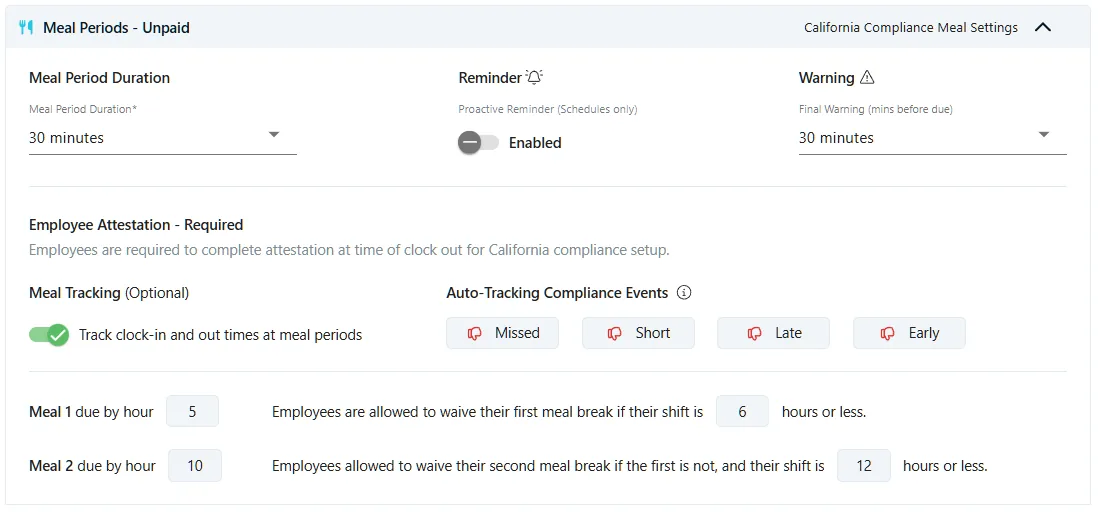
Set Break Tracking & Compliance to California, and Chronotek Pro applies your break rules to every shift: meal break length, reminder timing, final warnings, and the attestation employees complete at clock-out. No spreadsheets, and no depending on a supervisor to remember.
- Set your meal break length (for example, 30 minutes)
- Send scheduled employees reminders during the shift, plus a final warning before the meal deadline
- Attestation is required at clock-out — employees confirm their breaks or explain why not

Meal 1 due by hour 5. Meal 2 by hour 10. The system tracks both deadlines.
Chronotek Pro tracks each employee's actual hours worked against California's deadlines — not the schedule you hoped they'd keep. First meal before the end of hour 5, second meal before the end of hour 10, waiver thresholds at 6 and 12 hours. When a break goes wrong, it gets flagged.
- Applies the 6-hour and 12-hour waiver thresholds you configure
- Optional meal tracking records clock-out and clock-in times for meal breaks
- With meal tracking on, missed, short, late, and early meals are flagged automatically
- Shows payroll exactly which timecards need review before checks go out
Rest breaks are hard to prove. Attestation is your record — on every shift.
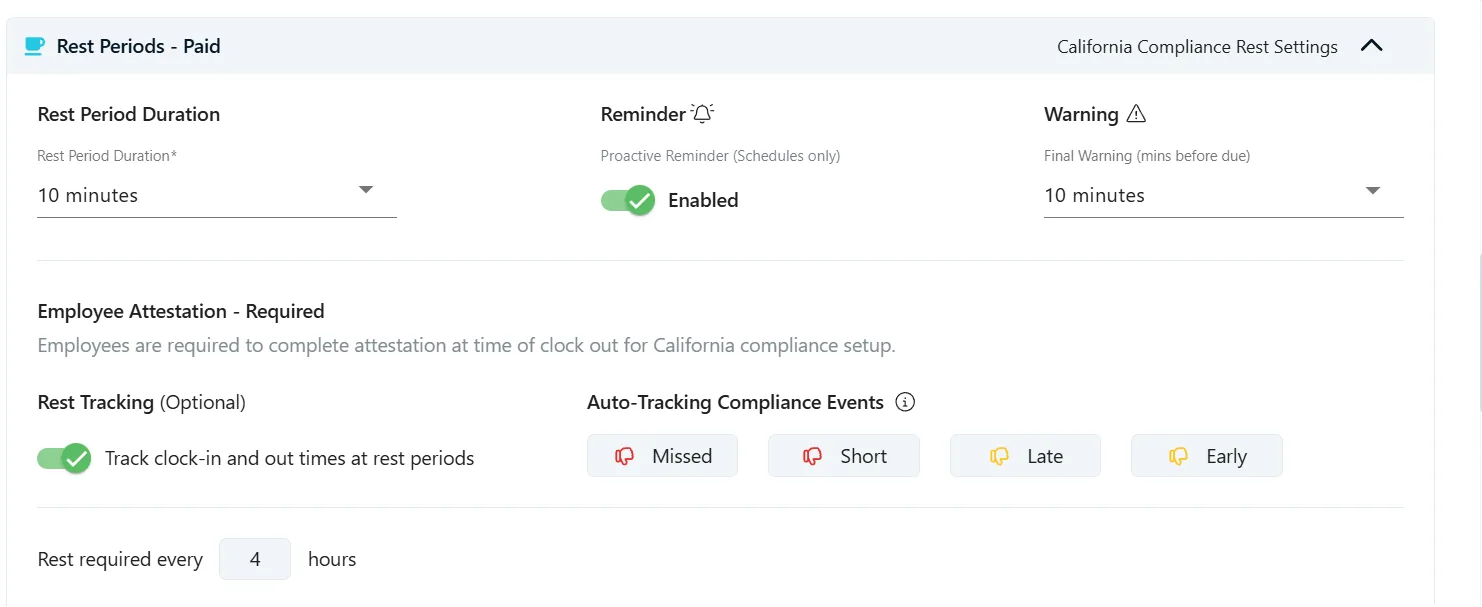
Because rest breaks are paid, most companies don’t collect punches for them — which makes them the hardest breaks to prove. Chronotek Pro reminds employees when a rest break is due, every 4 hours per your settings, and always collects attestation at clock-out: employees confirm they took their rest breaks, or give the reason they didn’t. Need more detail? Turn on optional Rest Tracking to record actual break times, so the system can determine compliance for each rest break.
- Set your rest break length and the rest-every-4-hours requirement
- Send reminders and warnings during the shift
- Attestation at every clock-out — employees confirm their breaks or explain why not
- Optional: track actual rest break times, so the system flags missed, short, late, and early breaks
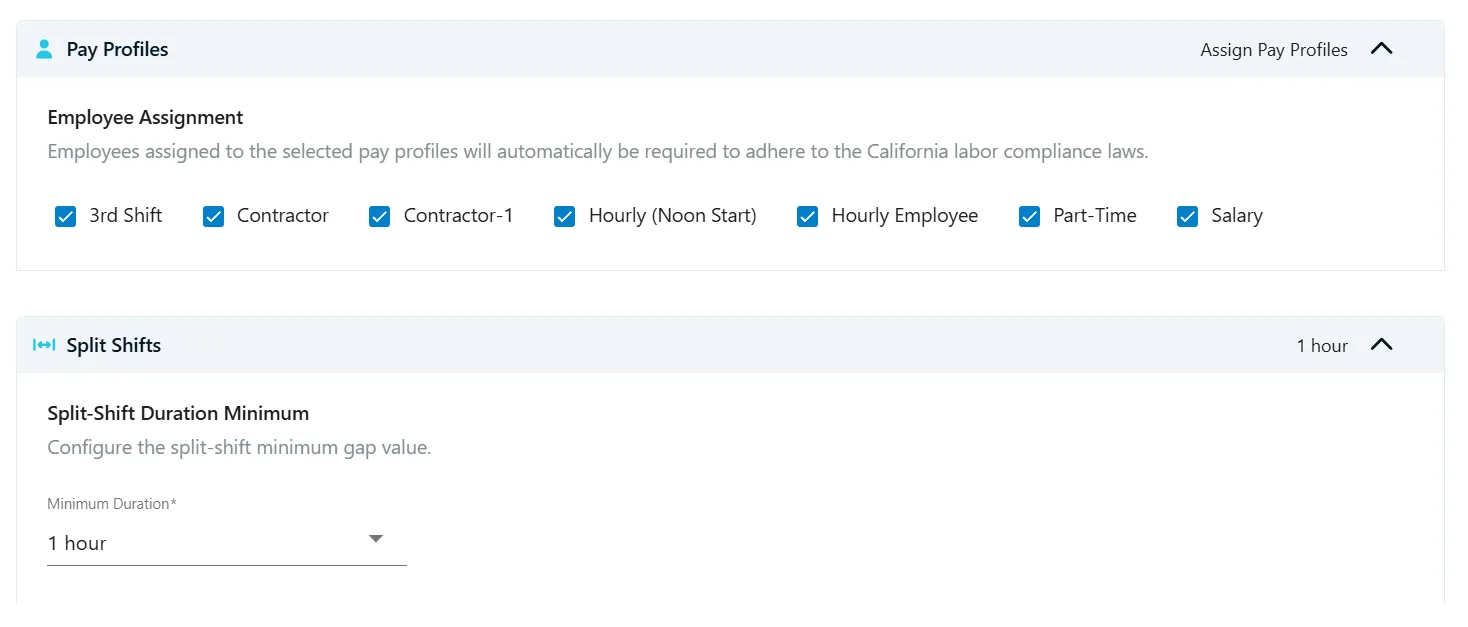
Assign a Pay Profile, and the California rules come with it.
Tie your California break rules to Pay Profiles, and every employee assigned to a profile gets the same rules automatically — including the crew member you hire next month. Your setup stays consistent as teams change, and split-shift settings live in the same place.
- Apply break rules by Pay Profile — not employee by employee
- New hires inherit the right rules the moment they’re assigned
- One consistent configuration across your California workforce
- Set the minimum gap that defines a split shift
Every break, documented from start to finish.
Chronotek Pro walks every break through the same six steps — from the reminder during the shift to the signed remediation document after it. Nothing depends on a supervisor being there, or on someone remembering to write it down.
Remind
Employees get in-app reminders during the shift, while there’s still time to take the break — not a write-up after it’s missed.
Document
The system records when — and whether — each required break was actually taken.
Confirm
At clock-out, each employee attests they took their breaks, or explains why they didn’t.
Flag
Missed, short, late, and early breaks are flagged automatically. Nothing slips into payroll unseen.
Alert
You’re alerted to any premium pay owed while payroll is still open — so it’s paid in the right pay period, not discovered in a claim.
Remediate
Remediation documents are produced for the employee to sign — closing the loop with a record you can point to later.
Built for teams that work where you can’t see them.
Janitorial, security, construction, property management — the industries where breaks are hardest to manage, because no supervisor is standing there when the break happens. That’s the exact problem this workflow solves.

Janitorial
Night crews clean while you sleep. Verify they’re on site, catch no-shows, and clear break flags before the morning payroll handoff.

Security
Lone posts and 12-hour shifts are where second meals and rest breaks get missed. Reminders, attestations, and flags — all in one supervisor view.

Construction & field service
Crews move between job sites all day. GPS clock-ins, job-site verification, schedule changes, travel time, and break tracking stay in one workflow.

Property management
Employees spread across properties, work orders, and shifting schedules — with timekeeping and breaks handled the same way at every one.
California compliance guides
Practical, plain-English guides to the rules California employers ask about most — written for service businesses with field teams.
A note on what Chronotek Pro is — and isn’t.
This page is general product information, not legal advice. Chronotek Pro does not determine your legal obligations, replace legal counsel, or guarantee compliance. California break requirements vary by employee classification, wage order, industry, collective bargaining agreement, and other circumstances. Have qualified California employment counsel review your company’s specific obligations, then set your policies — and Chronotek Pro — to match.
Watch a missed break get caught before payroll closes.
Bring your hardest schedule — night crews, lone posts, split shifts. We’ll walk the California workflow end to end: mobile clock-ins, break reminders, clock-out attestation, automatic flags, and the payroll handoff.
Schedule a California Demo